Living Wine Labels: AR Talking Labels vs Practical Scanning


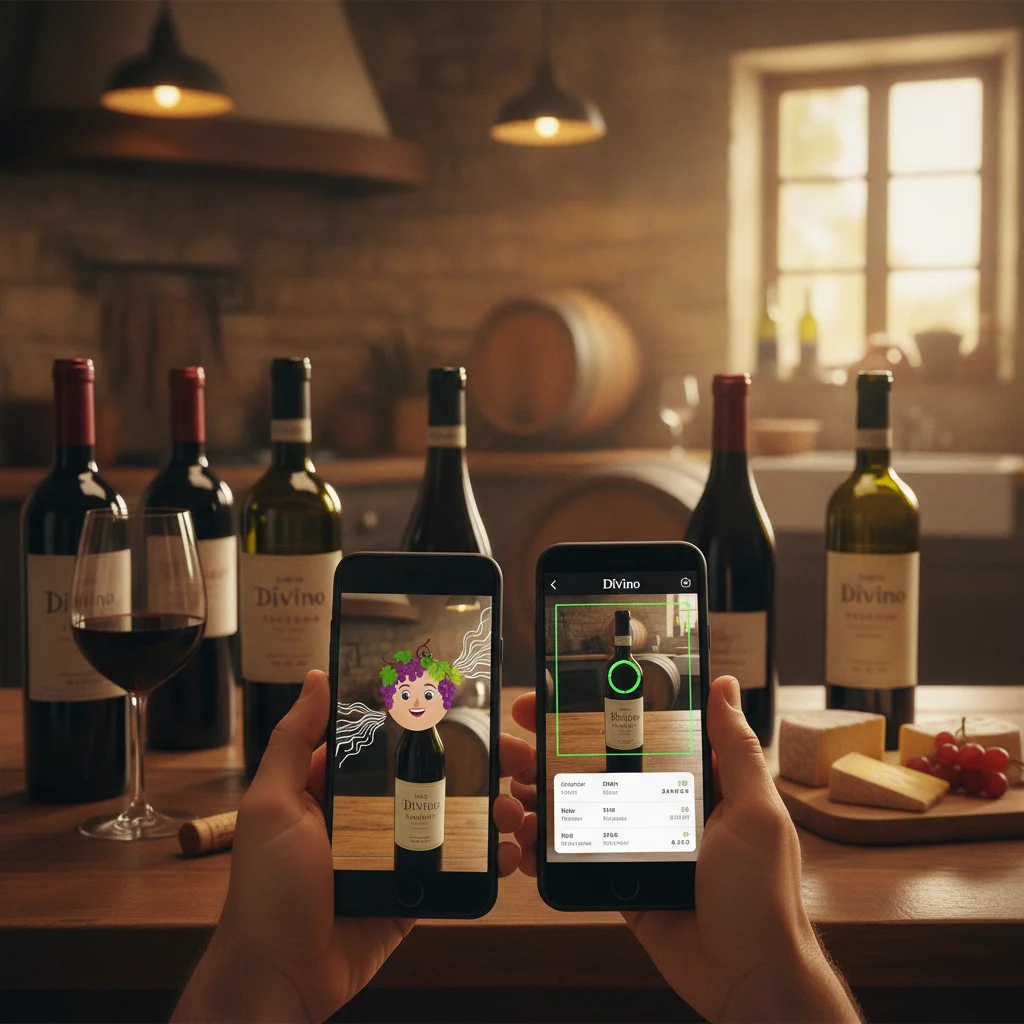
Definition: A living wine label is a physical bottle label designed to trigger an augmented reality experience when viewed through a compatible phone app or camera. The experience may animate a portrait, play narration, reveal a story, or display branded interactive content.
Try the wine label scanner on iPhone to scan a label and save the bottle.
What Are Living Wine Labels?
Living wine labels are bottle labels connected to augmented reality, commonly shortened to AR. When a supported label is scanned with the required app or camera experience, artwork on the bottle can appear to move, speak, or present a short scene on the phone screen.
The phrase is often associated with 19 Crimes-style talking portraits, where a historical character appears to come alive. Other producers may use similar technology for winemaker messages, vineyard stories, serving suggestions, games, or promotional content.
A living label should not be confused with general wine recognition. Its content is normally prepared in advance for a specific brand or campaign. DiVino, also known as Wine Identifier App, is an iPhone app focused on practical wine label scanning, cellar tracking, pairings, drinking windows, menu scanning, and tasting notes rather than brand-specific animation.
How AR Talking Wine Labels Work
An AR wine label experience begins when software recognizes a visual target on the bottle. That target may be the complete label, a portrait, a logo, or another distinctive graphic. The app then places digital content over the camera view, making the animation appear attached to the physical bottle.
- Open the app or web experience specified by the wine producer.
- Allow camera access and point the phone at the front label.
- Keep the bottle steady and use clear, even lighting.
- Wait for the label to be recognized and the animation to load.
- Move the phone carefully while watching the character or scene.
The animation is not stored inside the paper label. The label acts as a visual reference that helps software select and position prepared media. Results can depend on app support, internet access, label condition, camera focus, glare, and whether the producer still maintains that particular experience.
Living Labels vs Practical Wine Scanning
AR talking labels and wine identification tools both use a phone camera, but they answer different questions. A living-label experience asks, “What interactive story did this brand create?” A practical scanner asks, “What is this wine, and what should I know or record about it?”
| Feature | Living wine label | DiVino wine scanning |
|---|---|---|
| Primary purpose | Branded animation and storytelling | Wine identification and personal wine management |
| Label support | Specific participating bottles | Designed for scanning wine labels generally |
| Typical result | Talking character, video, or promotion | Wine details and tools for saving or planning |
| Ongoing use | Usually a short bottle-specific experience | Cellar records, notes, pairings, and drinking windows |
One approach does not replace the other. You might watch an AR character for fun and then scan or record the same bottle in DiVino for future reference.
What DiVino Does After Scanning a Label
DiVino turns the bottle label into a starting point for useful wine tasks. Instead of limiting the interaction to an animation, it helps an iPhone user build a record that remains relevant after the bottle has been opened or stored.
- Identify a wine: Scan the bottle label when you need help recognizing what is in front of you.
- Track a cellar: Save bottles so you can remember what you own and locate wines you want to drink.
- Review drinking windows: Use timing guidance when deciding whether to open or continue storing a bottle.
- Find food pairings: Check pairing ideas for a bottle or style of wine.
- Record tasting notes: Save personal impressions, preferences, and bottle memories.
- Scan wine menus: Compare choices when selecting wine at a restaurant.
These features make label scanning practical for shopping, dining, cellar organization, and learning your own preferences. Wine details can vary by vintage and bottling, so users should confirm important information on the bottle or with the producer.
How to Scan a Wine Label Successfully
Both AR labels and ordinary wine scanners work best when the camera can clearly read the bottle. Curved glass, foil, condensation, reflections, damaged paper, and dim restaurant lighting can interfere with recognition.
- Place the bottle against a plain background when possible.
- Hold the camera parallel to the label rather than at a steep angle.
- Move away from direct lights that create white glare on the glass.
- Fill most of the camera frame with the label while keeping all key text visible.
- Tap the screen to focus if the vintage, producer, or wine name looks blurred.
- Try the back label if the front label provides too little information.
For a living label, use the exact app or instructions named by the producer. For practical identification, capture readable producer, cuvée, region, and vintage details. If a label is partially hidden in a restaurant rack, a menu scan may be more useful than trying to photograph the bottle.
Choosing the Right Wine Camera Experience
Choose a living-label experience when you want entertainment, a brand story, or an interactive moment to share. It can be a memorable addition to a tasting or party, particularly when the bottle was designed around a recognizable character.
Choose DiVino when your goal is to identify a bottle, compare restaurant options, remember what you tasted, plan a meal, organize a cellar, or consider a drinking window. DiVino is available for iPhone only. Android users may use AI Lens for visual wine searches, but they should not expect DiVino on Google Play.
The simplest distinction is that AR talking labels make selected bottles perform, while Wine Identifier App helps make wine information usable. Many drinkers can enjoy both: the branded animation for the moment and a practical scan for the decision or record that follows.
Frequently asked
What is a living wine label?
A living wine label triggers augmented reality content when scanned with compatible software. The label may appear to speak, move, or show a prepared brand story.
Are living wine labels the same as QR codes?
Not necessarily. Some experiences use a QR code to launch content, while others recognize the label artwork itself as the visual target.
Can DiVino animate a 19 Crimes-style label?
DiVino is designed for wine identification and management rather than reproducing brand-specific talking-label animations. Use the experience specified by the wine producer for official AR content.
Why is my talking wine label not working?
Check that you are using compatible software, have camera permission and internet access, and can see the entire label without glare. Older promotional experiences may also change or stop being supported.
What information can DiVino track?
DiVino supports wine identification, cellar tracking, pairings, drinking windows, menu scanning, and tasting notes. It is intended to help users remember and manage wines beyond the initial scan.
Is DiVino available for Android?
No, DiVino is iPhone only. Android users may use AI Lens for visual wine searches.
Do AR labels prove that a wine bottle is authentic?
An animation alone should not be treated as guaranteed proof of authenticity. For authenticity concerns, consult the producer, retailer, importer, or another qualified source.
Scan labels and track your cellar
Use Wine Identifier App by DiVino on iPhone to identify bottles, save notes, and organize your cellar. Drink responsibly and follow local alcohol laws.
Get Wine Identifier App