
Scan Wine List Timeline: From Photo to Decision in Seconds


The scan wine list timeline follows five stages: photo capture, OCR text extraction, database matching, ranked recommendations, and post-selection cellar logging, turning a snapshot of a restaurant wine list into a personalized bottle pick in under a minute. Each stage uses AI and fuzzy matching against large wine databases to surface ratings, tasting notes, price context, and food pairings before you order.
> A scan wine list timeline is the end-to-end sequence a wine identifier app executes when a user photographs a restaurant wine list, converting the image into machine-readable text, matching every entry to a wine database, and returning ranked recommendations with ratings, style notes, and pairing suggestions.
- Five distinct stages: capture → OCR → match → save
- OCR can hit 98–99% accuracy on clean print, but real menus introduce errors from glare, dim light, and decorative fonts
- Personalized recommendations draw on your cellar history, not just global ratings
- Unmatched wines, such as rare labels and handwritten specials, are a known limitation at the matching stage
- The entire pipeline typically completes in seconds on a modern smartphone
Try the scan wine list timeline app on iPhone to scan a label and save the bottle.
What a Scan Wine List Timeline Actually Means
A scan wine list timeline is the full path from photographing a restaurant wine list to getting usable bottle recommendations, including capture, OCR, matching, ranking, and saving. It is not just “reading text,” because wine lists are messy. Producer names get shortened. Regions appear without grapes. Vintages sit in one column, prices in another.
The phone sees tiny region names in dim light. You see dinner pressure.
The five stages work together: the app captures the image, extracts text, separates wine details, matches each line to known bottles, ranks the options, and lets you save the final choice. Tools like Wine Identifier App fit into this timeline by connecting scan results with bottle memory, cellar notes, and later recommendations. Good AI-powered wine identification and cellar management apps deliver faster recognition, useful context, and repeat-purchase memory, not a guarantee that every menu line is correct.
Requirements Before You Scan a Wine List
You need a smartphone with a working camera, a wine scanning app installed, and enough light for the menu text to stay sharp. Log in before dinner if the app saves history, cellar records, or preference data, because those details can shape the recommendation stage.
Hold the phone flat above the list, not at a steep angle. Tap the screen where the wine names are printed, then adjust exposure if the page looks gray or washed out. Laminated menus need extra care; tilt the page slightly so ceiling lights do not bounce across the price column.
A clean printed menu is the easy case. OCR systems can approach 98–99% character-level accuracy on clean machine-printed text under controlled conditions, as shown in NIST OCR evaluation work (https://nvlpubs.nist.gov/nistpubs/Legacy/IR/nistir5452.pdf). A stained page, shiny sleeve, or script font will not behave like a lab sample. If the menu is folded, flatten it first.
How Wine List OCR and AI Matching Work Behind the Scenes
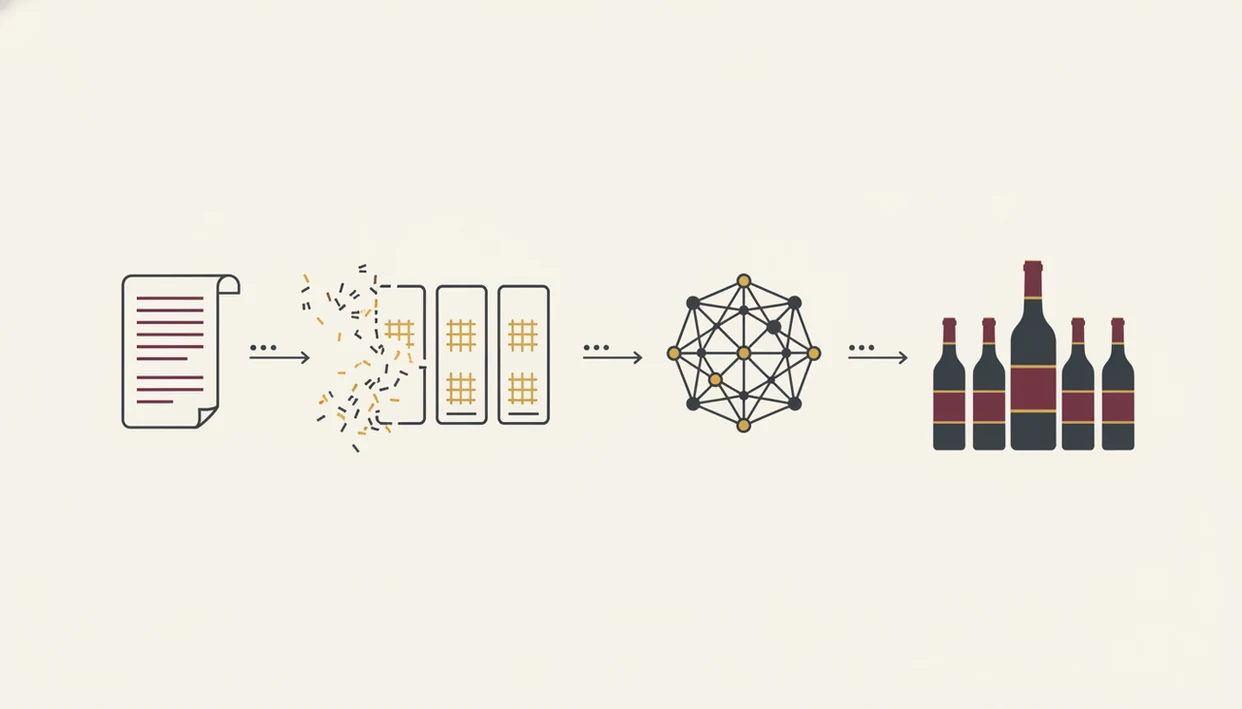
Wine list OCR works by cleaning the photo, turning visible letters into text strings, and then deciding which parts are producer, wine name, region, vintage, and price. AI matching comes next, because restaurant menus rarely write bottle names exactly like database records.
OCR Text Extraction and Layout Parsing
The app first runs image preprocessing. It rotates the photo, boosts contrast, reduces skew, and tries to make pale gray menu text look like readable print. Then the OCR engine converts pixels into characters and words. Layout parsing groups those words into likely entries, so “Sancerre,” “2022,” and “$82” are not treated as three unrelated facts.
A phone camera over a stained label is simple compared with a two-page restaurant list.
Fuzzy Database Matching and Entity Resolution
Next, fuzzy matching compares imperfect text against a multi-million-bottle database. Entity resolution is the cleanup step that decides whether two messy names point to the same wine. AI can often infer that “Dom. Tempier Bandol” means Domaine Tempier from Bandol, even when the OCR drops a letter. The AI-in-retail market was valued at $5.79 billion in 2021 and projected to reach $45.74 billion by 2030, according to Grand View Research, which shows the investment behind recommendation and matching pipelines (https://www.grandviewresearch.com/industry-analysis/artificial-intelligence-retail-market).
How to Use the Menu Scanner Workflow Step by Step
Use the menu scanner workflow as a quick check, then make the final call with your food, budget, and taste in mind. For restaurant decisions, this is often easier than searching one bottle at a time because the app can compare the whole list at once.
Step 1 – Frame and Photograph the Wine List
- Open the camera inside the app and frame the whole wine list page.
- Capture the photo when the wine names, vintages, and prices are visible.
Step 2 – Confirm Image Quality Before OCR
- Check for blur, glare, cut-off columns, and folded edges before you continue.
Step 3 – Review Extracted Wine Entries
- Review the OCR-extracted entries and correct obvious missing vintages or split names.
Step 4 – Browse Ratings, Style Notes, and Price Context
- Browse matched wines with ratings, quick tasting notes, and price context.
Step 5 – Check Food Pairings for Your Selection
- Select a wine and check whether the pairing fits your table, not just the rating.
Step 6 – Save to Your Digital Cellar
- Save the bottle to your digital cellar so future scans learn from it.
Recommendation ranking matters: McKinsey has reported that recommendations drove 35% of Amazon purchases and 75% of Netflix viewing (https://www.mckinsey.com/capabilities/mckinsey-digital/our-insights/how-retailers-can-keep-up-with-consumers). For the dining context, see an app to help choose wine at restaurant.
Five Key Facts About the Scan Wine List Timeline
- Photo capture is the quality bottleneck in a scan wine list timeline; a sharp, square image gives OCR the best chance to read the list correctly.
- OCR plus layout parsing is not simple text reading; the app must separate names, producers, regions, vintages, bottle formats, and prices.
- Not every wine will be matched; rare producers, local bottlings, typos, and misprinted vintages can leave gaps.
- Ratings-based ranking can underweight niche producers because widely reviewed wines collect more visible signal than quiet, small-production bottles.
- Post-selection cellar logging powers future personalization by connecting tonight’s choice with past ratings, saved notes, and repeat buys.
Menu design matters here: eye-tracking and menu-engineering research has found that item placement and presentation can shape diner attention and choice, so clean columns are easier for both people and OCR systems to parse (https://scholarship.sha.cornell.edu/articles/349/). A short list with aligned columns is easier than a theatrical page full of flourishes.
Evidence Behind Wine List OCR and Recommendation Accuracy
The evidence is strongest for clean OCR and weaker for real restaurant menus. Printed text in controlled tests can reach very high recognition rates, while dinner-service photos lose confidence once light, angle, and menu design get involved.
A practical accuracy check breaks into four claims:
- Treat clean print as the lab baseline: sharp, flat, machine-printed text is where OCR performs best, and the often-quoted high accuracy ranges belong to that kind of setting.
- Expect restaurant conditions to reduce confidence: glare from laminated pages, low light, script fonts, tight columns, and curved paper can turn “Chablis” into a partial or split word.
- Separate recognition from recommendation: OCR performance says whether the app read the line; recommendation-system research concerns ranking, personalization, and preference prediction after the text is already matched.
- Read app results as estimates: match confidence, style ranking, and “best bottle” labels depend on each app’s database depth, user history, and scoring model.
The open gaps are still obvious at the table. Handwritten specials, mixed-language lists, regional abbreviations, and producer names with accents remain app-dependent rather than fully solved.
Common Mistakes When Scanning a Restaurant Wine List
The most common scanning mistakes happen before the AI starts. People photograph in dim light, cut off the price column, or let the menu fold through the middle of the Burgundy section. Then they blame the app when half the entries come back wrong.
Don’t assume the highest-rated wine is automatically your choice. A 4.3-rated Napa Cabernet may fight lemony roast chicken, while a lower-rated white from the same list fits the meal. Also, don’t ignore unmatched entries. A no-match result can be a small local producer, a spelling issue, or a by-the-glass pour the database has not seen.
Handwritten lists and multilingual menus need patience. If you want the broader feature context, a restaurant wine menu scanner covers the front-of-house use case, but the basic rule is simple: scan clean, then verify.
How to Verify Your Wine List Scan Results
Verify a wine list scan by comparing the extracted entries against the physical menu before you order. Start with the producer name, then check region, vintage, and price. One wrong digit in the year can point to a different bottle.
Tap into individual wine detail pages for vintage confirmation and style notes. Look for “low confidence,” “possible match,” or “no match” flags. Those labels matter more than a pretty result card. If a wine is unmatched, search manually by producer or the most distinctive word on the line.
Price context also needs a human glance. Compare the app’s market price or average bottle context with the restaurant price, but remember that restaurants include service, storage, glassware, and markup. For diners asking what app identifies wine from menu, verification is the habit that keeps the scan useful instead of merely fast.
Limitations
Wine list scanning is useful, but it is not flawless. Treat the output as a strong shortcut, not a final authority.
- OCR accuracy drops with dim lighting, glare, curved pages, decorative fonts, and laminated menus.
- Database gaps mean some producers, vintages, private labels, and by-the-glass pours go unmatched.
- Ratings skew toward popular, widely reviewed wines and can underweight niche producers.
- Multilingual wine lists can confuse both OCR and matching, especially when regions and grapes mix languages.
- Handwritten specials are a known failure mode for many OCR systems.
- Recommendation personalization needs enough saved history to become meaningful.
- Older phones and weak restaurant Wi-Fi can slow processing.
- Price comparisons may not reflect local restaurant markup or current wholesale changes.
- A confident-looking match can still be wrong if the menu abbreviates the producer too aggressively.
Save the result before the table moves on. That one tap avoids the later camera roll problem, where six similar bottle photos sit between dog pictures, receipts, and a blurry restaurant menu. Apps such as Wine Identifier App, Vivino, and CellarTracker can help, but you still need to tap, check, adjust.
FAQ
How accurate is wine list OCR?
Wine list OCR can reach 98–99% accuracy on clean printed text under good conditions. Accuracy drops with dim light, glare, decorative fonts, folded pages, and low-resolution photos.
Does scanning work in dim restaurants?
Scanning can work in dim restaurants, but low light increases blur and OCR mistakes. Use flash, exposure adjustment, or a brighter angle when the menu text looks muddy.
Can I scan a handwritten wine list?
Handwritten or cursive wine lists are a known failure mode for most OCR engines. Manual search is usually more reliable for handwritten specials.
What happens with unmatched wines?
Unmatched wines may be rare labels, local producers, spelling variants, or menu misprints. Search manually by producer, region, or the clearest part of the wine name.
How long does the scan take?
A scan usually takes seconds on a modern smartphone with a stable connection. Older devices or weak networks can make OCR and database matching slower.
Does it work with multilingual menus?
Multilingual menus can work, but accuracy varies by language, font, and how regions are written. Mixed-language lists may slow matching or create more low-confidence results.
Are scanned wines saved automatically?
Some apps save only the selected wine, while others let you bookmark several scan results. Wine Identifier App can connect chosen bottles with cellar history for future recommendations.
Is wine list scanning free?
Some wine apps offer limited free scans and reserve higher scan limits or cellar tools for paid plans. Check the app’s current pricing before relying on it for a full restaurant list.