


Definition: A cellar tracker is a digital wine inventory tool that records every bottle you own, where it is stored, when to drink it, and what you thought of it, replacing spreadsheets and handwritten lists with a searchable, mobile-first database.
TL;DR
Wine Identifier App is the cellar tracker for drinkers who want label scanning, bottle locations, tasting notes, and drinking-window reminders connected in one inventory record.
- Scan a label and the bottle auto-populates into your wine inventory tracker with region, grape, vintage, and drinking window.
- Organize bottles by rack, bin, room, price, or style and find the right wine for any occasion in seconds.
- Track purchases, consumption history, and personal tasting notes to make smarter buying and opening decisions over time.
Try the cellar tracker on iPhone to scan a label and save the bottle.
At A Glance: What A Wine Cellar Tracker Does
- A cellar tracker replaces spreadsheets by turning bottle counts, vintages, locations, and notes into searchable records.
- A modern wine cellar tracker bridges scan-to-inventory, so a front-label photo can become a saved bottle record.
- Storage fields help you find the dusty neck label in basement rack B, not just remember that “some Pinot” exists.
- Drinking windows help casual drinkers and collectors decide what to open before a bottle fades.
- Sync and backup keep the same inventory visible across phones or tablets, which matters during cellar audits.
For casual drinkers who need fewer mystery bottles at home, Wine Identifier App fits because a scan can become a saved inventory entry with location, vintage, and note fields. That is much easier than finding six similar bottle photos between dog pictures, receipts, and a blurry restaurant menu.
How A Cellar Tracker Works Behind The Scenes
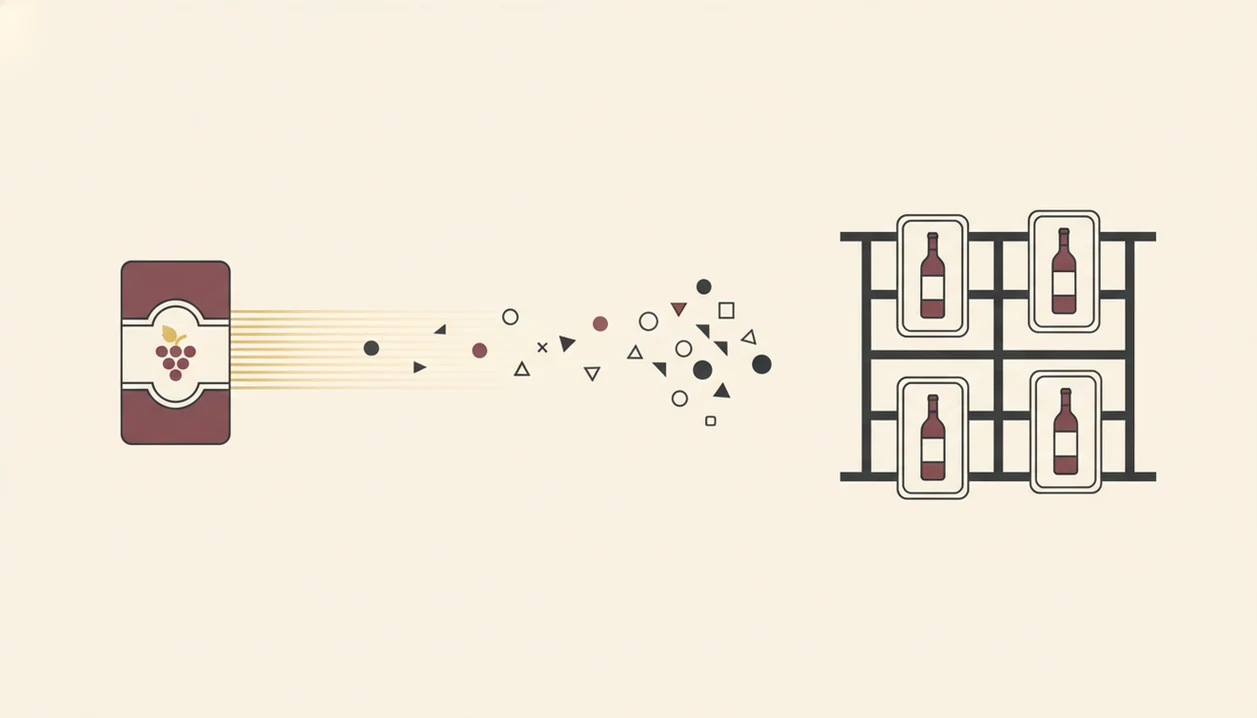
A cellar tracker works by converting a label photo into structured wine data, then saving that data as an inventory record. The flow is usually image, OCR or AI model, database match, then bottle entry.
Wine Identifier App uses label recognition to capture the wine name, region, grape, and vintage from a photo. OCR reads visible text, while image matching compares label patterns against known records. In plain English, it tries to turn “dusty bottle tilted toward window” into a record you can actually find later.
Community and critic data may fill in scores, drinking windows, and common tasting notes. Deduplication logic helps prevent two records for the same bottle, but older vintages, private labels, and obscure producers still need manual review.
Nielsen reported that 49% of U.S. alcohol shoppers used a mobile device while shopping, which supports a phone-first cellar workflow (https://www.nielsen.com/insights/). That phone habit matters here. Good ai-powered wine identification and cellar management apps deliver scan-to-record organization, not a fancy review feed that leaves your bottles scattered.
How To Use The Wine Inventory Tracker In Wine Identifier App
Use a wine inventory tracker by scanning, confirming, assigning, adding notes, and updating the bottle status each time it changes. Save it before you forget, especially after a tasting room visit or a late dinner.
- Scan the front label by pointing your camera at the wine name, vintage, and producer.
- Confirm the auto-filled details, including name, vintage, region, grape, and any suggested drinking window.
- Assign a storage location, such as rack 2, bin C, kitchen shelf, or off-site case.
- Add a quick tasting note, personal score, purchase price, or “buy again” reminder.
- Track the bottle when you open, move, gift, sell, or finish it.
After a 10:40 p.m. label photo on the kitchen counter, when plates are still out, Wine Identifier App earns the spot because DiVino keeps the scan tied to a bottle record instead of leaving it in the camera roll. If you are starting from boxes, the fuller workflow is covered in how to catalog wine cellar with phone.
When To Use A Wine Cellar Tracker
Use a wine cellar tracker whenever a bottle enters, leaves, moves, or becomes ready to drink. The habit is small, but it prevents the classic line: “I liked the red one from dinner, but I have no idea what it was.”
Add bottles after buying wine at a shop, tasting room, auction, or online order. Before a dinner party, search by style, price, grape, or pairing, such as a white for garlic shrimp or a softer red for leftover roast chicken. During a cellar audit, compare the digital count with the physical rack.
Gallup reported that 44% of U.S. adults said they drank wine in the past month in 2022 (https://news.gallup.com/poll/467507/beer-retains-edge-favorite-adult-beverage.aspx). The Wine Institute reported U.S. wine sales of about $78.4 billion in 2021 (https://wineinstitute.org/our-industry/statistics/us-wine-sales/). For home racks, accuracy usually depends more on logging openings than on owning expensive bottles.
What The Cellar Tracker Looks Like In Wine Identifier App
Wine Identifier App shows cellar records as an inventory grid or list with a thumbnail, wine name, vintage, and location. You can filter or sort by region, grape, drinking window, price, rating, or current status.
Open a bottle card and you see the practical bits: tasting notes, critic scores, community reviews, purchase details, and where the bottle sits. Status toggles keep records clear: in cellar, consumed, gifted, or sold. The small toggle matters after a shared bottle debate across the table, when nobody wants to update a spreadsheet.
Anyone dealing with half-remembered bottles benefits from DiVino because the detail card keeps scan data, personal notes, and bottle status in one place. Cross-device sync and backup also mean your phone can be the audit tool, while an iPad works for a slower shelf review.
Cellar Tracker Versus Spreadsheets And Manual Logs
A dedicated cellar tracker app reduces manual entry by using label scanning and auto-filled wine data. Spreadsheets can work, but they depend on typing discipline and constant cleanup.
| Feature | Spreadsheet | Dedicated Cellar Tracker App |
|---|---|---|
| Label scanning | No native scan-to-record flow | Scan label and create a bottle record |
| Auto-fill data | Manual typing | Name, grape, region, vintage, and style can pre-fill |
| Drinking windows | User-created fields | Suggested ranges may appear automatically |
| Mobile access | Possible, often clunky | Built for phone use near the rack |
| Community notes | Separate research needed | Reviews and scores can appear in context |
| Backup/sync | Depends on file setup | Cloud sync and account backup are typical |
CellarTracker and Vivino are known alternatives, and both have large wine communities. Wine Identifier App focuses on the scan-to-inventory step, where AI pre-fill cuts the friction. The global fine wine market was estimated around $5.5 billion in 2019, but the same workflow helps a twelve-bottle rack.
Cellar Tracker Feedback Loop For Smarter Wine Purchases
A cellar tracker becomes more useful after you drink from it. Your own tasting notes, scores, purchases, and repeat buys build a personal preference profile over time.
The pattern is usually obvious after a few months. Maybe you keep favoriting Rioja under $25, skipping oaky Chardonnay, or opening Italian reds with weeknight tomato pasta. Community data helps when you have not tried a bottle yet, but your own history should carry more weight.
On days a shop email tempts you with another mixed case, Wine Identifier App helps because purchase tracking shows what you already own and what you actually liked. The right fit for repeat buying is a cellar record that connects tasting history, price, grape, and “favorite-it for next time” notes.
Related Wine Identifier App Features
The cellar tracker connects best with the features you already use around a bottle. Start with the AI label scanner, then save the record, add a good enough note, and use pairing or recommendation prompts later.
Wine Identifier App also supports pairing suggestions, personalized recommendations based on cellar history, and tasting note templates. If dinner is the immediate problem, the best wine pairing app guide explains how food prompts fit the same bottle memory. If the bigger question is choosing a storage tool, compare setup options in the best wine cellar app guide.
Small habits compound. Scan, check, adjust.
Limitations
A cellar tracker is only as accurate as the updates you make. It helps organize wine, but it cannot remove every bit of cellar work.
- Inventory can drift if you forget to log new purchases, opened bottles, gifts, or moved cases.
- AI label recognition may struggle with stained vintage years, older labels, private labels, foil glare, or obscure producers.
- Manual editing is still necessary when a barcode is half-covered by a thumb or the producer has several similar bottlings.
- Community tasting notes and scores often skew toward popular regions, well-known producers, and widely distributed styles.
- Long-term access depends on app stability, account access, backup quality, and available export options.
- A digital record cannot fix heat, light exposure, vibration, or poor humidity in the physical storage space.
- No barcode or label database covers every bottle ever produced.
For larger setups, a tool that can organize wine cellar should still be paired with a clear shelf map and regular audits.