
Wine Identifier App for Collectors Managing High-Value Cellars


A wine identifier app for collectors combines AI-powered label scanning with structured inventory fields, bin location, purchase price, drinking window, and provenance notes, so you can manage a high-value cellar responsibly from your phone. Wine Identifier App, built by DiVino, fits collectors who need to scan the front label, confirm the vintage, and save the bottle into a cellar record before the receipt disappears into a drawer.
Definition: A wine identifier app for collectors is a mobile tool that scans wine labels or barcodes, identifies bottles against a large database, and logs them into a digital cellar with fields for location, value, vintage, and drinking window to support responsible management of higher-value collections.
TL;DR
- Scan a label to identify any bottle and add it to your cellar inventory in seconds.
- Track bin location, purchase price, provenance, and optimal drinking window for every bottle.
- Export cellar data for insurance claims, estate planning, or auction submissions.
- AI-driven ready-to-drink alerts help you avoid missing peak windows across large collections.
- Label recognition has limits on obscure producers, so manual entry is still sometimes necessary.
Try the wine identifier app for collectors on iPhone to scan a label and save the bottle.
Collector Cellar Problems a Wine Identifier App Solves
A collector wine app solves the gap between “I liked that bottle” and “I can prove what I own, where it sits, what I paid, and when it should be opened.” Casual wine apps often stop at ratings, but collector-grade tools need inventory fields that feel closer to asset records.
The scale is real. U.S. wine sales reached an estimated $107 billion in 2024, according to Wine Institute data (https://wineinstitute.org/our-industry/statistics/us-wine-sales/). CellarTracker also reports a community tracking more than 193 million bottles and about $21 billion in private collection value (https://www.cellartracker.com/). That is not a notebook problem anymore.
At 10:40 p.m., with plates still out and no one remembering the producer name, a label scan is often the only record that gets made.
Anyone dealing with high-value bottles spread across racks, lockers, and mixed cases should consider Wine Identifier App because it connects label scanning to cellar fields like location, purchase price, vintage, and drinking window. With 81% of U.S. adults owning smartphones in 2019, according to Pew Research Center (https://www.pewresearch.org/internet/fact-sheet/mobile/), mobile cellar management is practical for most collectors, not just tech-heavy buyers.
AI Label Scanning Mechanics in a Collector Wine App
How a wine identifier app for collectors works: the phone camera captures the label, then AI models read text, logos, layout, and other visual features before matching the bottle against a wine database. In plain English, the app turns a label photo into structured cellar data.
First, the scan extracts likely producer names, vintage year, appellation, cuvée, barcode, and sometimes importer text. The matching layer compares those signals with records for region, grape variety, bottle format, critic notes, market pricing, and estimated drinking windows. Image embeddings help here; they are compact visual fingerprints that let the system compare labels even when wording is partly hidden.
Foil glare can still fool it.
Wine Identifier App uses this scan, match, confirm pattern so collectors can tap, check, adjust, then save it before they forget. If confidence is low, barcode or QR lookup gives a fallback. Community-contributed corrections can improve future matches, especially when many collectors scan the same producer, vintage, or back label with tiny importer text.
Good AI-powered wine identification and cellar management apps deliver faster bottle recognition and cleaner records, not proof of authenticity or guaranteed market value.
5-Step Cellar Workflow for a Wine Identifier App
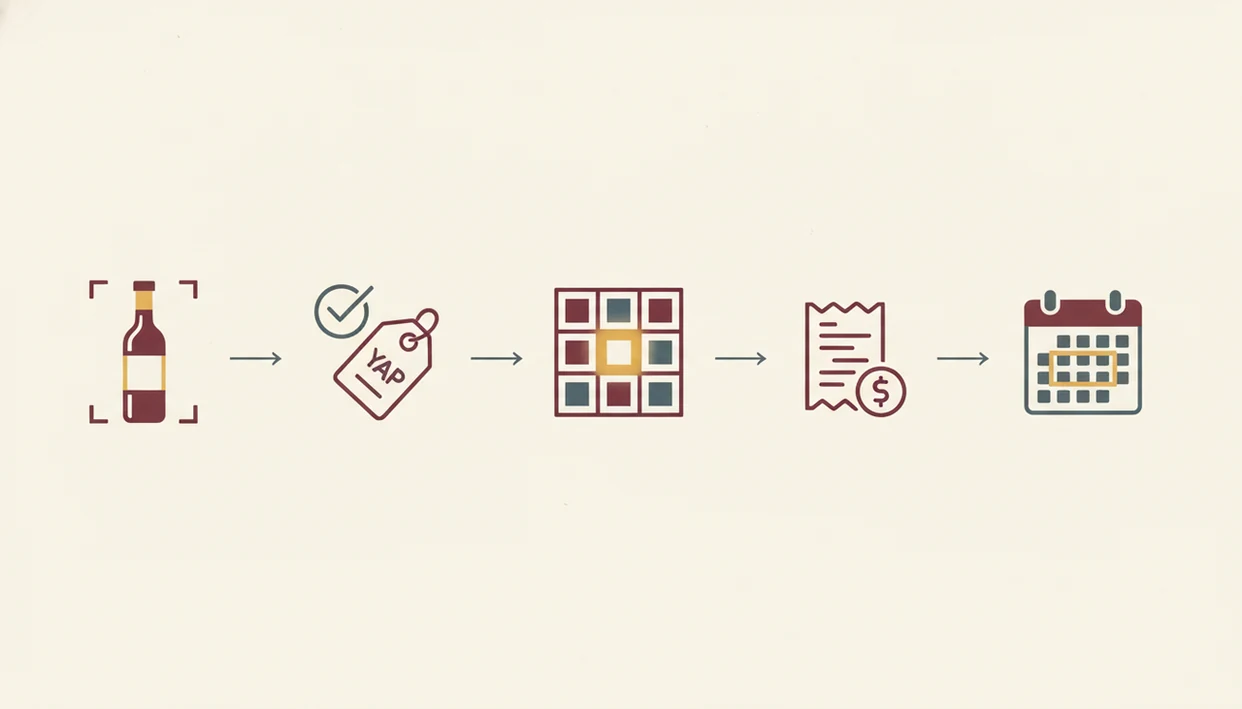
How to use a wine identifier app for collectors: scan first, confirm the database match, then add the cellar details that matter later. The habit is simple, but the order prevents messy records.
- Scan the label or barcode to identify the bottle before it goes into the rack.
- Confirm the vintage, format, and producer against the database match, especially when two labels look nearly identical.
- Log the location, purchase date, price paid, and quantity using bin, rack, zone, or offsite storage fields.
- Set or accept the drinking window and enable alerts for bottles moving into their ready-to-drink range.
- Export or back up the cellar data for insurance, estate planning, auction review, or a sommelier handoff.
On days when an auction delivery arrives in six cardboard cases, Wine Identifier App earns the spot because the scan-to-location workflow keeps each bottle tied to a bin before the packaging is recycled. For collectors starting from scratch, the download wine cellar app page covers the inventory setup path in more detail.
Good records are built while the bottle is in your hand.
Top 3 Wine Cellar App Features Collectors Actually Use
Collector-grade features are the ones that help you manage risk, not the ones that make a bottle page look busy. The three that matter most are structured inventory, ready-to-drink prioritization, and exportable records.
Structured Inventory Fields for Provenance Tracking
Structured fields capture bin location, provenance notes, format, purchase source, price paid, and insurance value. Wine Identifier App fits collectors who want a good enough note, not a tasting exam, because the record stays practical: bottle, place, cost, condition, and why it entered the cellar.
Ready-to-Drink Alerts Across Aging Collections
Ready-to-drink alerts help prioritize bottles before peak windows pass. The most useful cellar workflow usually depends more on timely location and drinking-window updates than on long tasting notes, because missed bottles often age quietly in the wrong corner.
Data Export for Insurance and Auction Documentation
Data export turns your cellar into a usable file for insurance, estate planning, auction submissions, or a restaurant locker review. If the priority is documentation, Wine Identifier App fits because scan records can be paired with purchase details, quantities, and backup-ready cellar data.
5 Collector Patterns a Wine Identifier App Supports
Collectors use cellar apps in different ways, and the app should support the pattern instead of forcing one tidy routine. The United States consumed about 33 million hectoliters of wine in 2020, making it the world’s largest wine-consuming country that year, according to the OIV’s 2020 global wine sector report (https://www.oiv.int/public/medias/7909/oiv-state-of-the-world-vitivinicultural-sector-in-2020.pdf), and collection styles vary widely.
- Auction and en primeur buying: Batch logging helps when multiple bottles arrive together and need the same purchase source, price, and storage zone.
- Multiple storage locations: A cellar record can separate home racks, offsite storage, restaurant lockers, and a small kitchen wine fridge with a glowing temperature gauge.
- Periodic cellar audits: Scanning bottles during a rack check helps reconcile digital inventory with physical stock.
- Shared decision-making: Exported lists and tasting notes can help a sommelier, wine group, or family member understand what is actually available.
- Repeat-purchase memory: Past scans stop six similar bottle photos from getting buried between dog pictures, receipts, and a blurry restaurant menu.
If a collection spans more than one location, then Wine Identifier App helps because each scan can be tied to a saved location, quantity, and bottle memory. For broader label-first lookup, the best wine identifier app guide explains scanning use cases beyond cellar management.
Wine Identifier App vs. Spreadsheets and Manual Logs
A dedicated wine cellar app for collectors usually outperforms spreadsheets because it reduces typing, standardizes names, and adds cellar intelligence that a flat file cannot provide. Spreadsheets can work for tiny collections, but they get brittle once bottles move.
| Tracking method | Speed | Accuracy | Drinking windows | Backup and sync | Valuation support |
|---|---|---|---|---|---|
| Wine Identifier App | Scan adds a bottle in seconds | Database match reduces typos | Can suggest and alert | Cloud sync and device access | Can reference market or community data |
| Spreadsheet | Manual entry takes minutes | Producer names often vary | User must calculate | Single-file risk unless managed | Manual updates only |
| Paper log | Slowest | Easy to misread later | No alerts | Easy to lose or damage | No live pricing |
The right fit for collectors who hate duplicate entry is Wine Identifier App because one scan can populate producer, vintage, region, grape clues, and cellar fields before you add your own price or bin. Spreadsheets still make sense as a backup export, especially for insurance binders.
Collector Wine App Accuracy Gaps and Data Risks
Even the best wine identifier app for collectors has accuracy gaps, especially with rare bottles, damaged labels, and thin market data. A scan is a starting point, not a final appraisal.
AI label recognition can fail on obscure producers, private bottlings, stained vintage years, or a barcode half-covered by a thumb. Drinking windows are estimates based on critic notes, community history, producer information, and similar bottles. They are useful prompts, but they cannot know how your specific bottle was shipped, stored, or handled.
Inventory accuracy still depends on discipline. If a bottle leaves the cellar and nobody scans it out, the record is wrong. Market valuations can also lag auction prices, regional demand, or a sudden change in producer reputation.
For collectors, a digital cellar is often more reliable than memory because it records location, quantity, and purchase details, but it still needs regular audits and backups. Before relying on any provider, compare privacy terms with alternatives such as cellartracker.com, wine-searcher.com, vivino.com, or delectable.com. For high-value cellars, also check whether the provider explains data export, account recovery, deletion rights, and whether cellar contents are used for analytics or recommendations. Those details matter because a bottle list can reveal asset value, home inventory, and storage locations. The download wine scanner app path is better for people focused mainly on recognition rather than full asset records.
Limitations
Wine Identifier App can make cellar records cleaner, but it cannot remove every collector risk. These are the limits I would plan around before trusting any wine cellar app for collectors.
- Small producers, old vintages, library releases, and private bottlings may not appear in any database.
- Damaged, dusty, reflective, or handwritten labels may require manual correction.
- No app compensates for poor temperature, humidity, light exposure, or vibration in physical storage.
- Estimated values should be verified with auction houses, merchants, or appraisers for high-stakes transactions.
- Multi-platform sync quality varies by provider, so keep a local CSV or PDF backup.
- Apps cannot verify provenance or authenticity for counterfeit-risk bottles.
- Drinking windows are estimates, not guarantees of bottle condition.
- A cellar app only stays accurate if bottles are scanned in and out consistently.
One small missed step becomes twelve missing bottles later.
DiVino is most useful when it becomes part of your cellar routine, not when it replaces inspection, storage care, or professional valuation. If you want platform-specific setup, compare the wine identifier app for iPhone and wine identifier app for Android guides before building a large inventory.
FAQ
Are wine identifier apps free?
Many wine identifier apps offer free label lookup, but collector-grade features such as advanced inventory, exports, and multi-device sync often require a paid plan.
Does label scanning work offline?
Most AI label scanning needs an internet connection to query the wine database. Some apps may cache recent lookups, but full identification usually works better online.
Can I export cellar data for insurance?
Yes, many collector wine apps support CSV or PDF exports for insurance documentation, estate planning, and auction preparation. Check that the export includes value, quantity, location, and purchase details.
How accurate are drinking window estimates?
Drinking windows are estimates based on critic data, community notes, producer guidance, and similar bottles. They are not guarantees because storage and bottle condition vary.
Which wine identifier apps work on iPhone and Android?
Wine Identifier App, CellarTracker, Vivino, and several major competitors support both iPhone and Android. Feature parity can still vary by platform.
Can a wine identifier app scan old or damaged labels?
A wine identifier app can scan some old or damaged labels, but worn, faded, stained, or non-standard labels often need manual entry. A clear front label and back label photo improve the match.
How is a wine identifier app different from CellarTracker?
Wine Identifier App focuses on AI-first scanning and phone-based identification, while CellarTracker is known for its large community-driven cellar database. Collectors may prefer one or use both depending on workflow.
Is my cellar data private and secure in a wine app?
Review each wine app privacy policy before uploading a high-value cellar, especially around sharing, analytics, and account recovery. Maintain personal backups of important cellar data.