
Wine Label Scanner vs Cellar Tracker: Key Differences for Every Wine Drinker


When comparing a wine label scanner vs cellar tracker, the core difference is purpose: a label scanner identifies a bottle from a photo, while a cellar tracker manages bottles you own over time. Wine Identifier App, by DiVino, is useful when you want one phone workflow that starts with label scanning and can continue into cellar records.
Definition: A wine label scanner identifies a bottle from a photo and returns ratings, tasting notes, and prices; a cellar tracker manages an ongoing inventory of owned bottles with storage locations, quantities, purchase history, and drinking windows.
TL;DR
- Label scanners excel at in-store identification and quick purchase decisions; cellar trackers excel at organizing, auditing, and planning a home collection.
- Scanning a label does not automatically create a full inventory record, you still need location, quantity, and consumption logging for accurate cellar management.
- AI-powered wine apps now combine instant label recognition with structured cellar fields, closing the gap between the two tool categories.
Try the wine label scanner vs cellar tracker app on iPhone to scan a label and save the bottle.
At-a-Glance Wine Label Scanner vs Cellar Tracker Comparison Table
A wine label scanner answers “what is this bottle?” while a cellar tracker answers “where is every bottle I own?” Some AI wine apps now merge both jobs, which matters when your camera roll has six similar bottle photos between dog pictures, receipts, and a blurry restaurant menu.
| Capability | Wine label scanner | Cellar tracker |
|---|---|---|
| Primary purpose | Fast bottle identification | Long-term collection management |
| Input method | Front label photo, barcode, sometimes menu scan | Label scan, barcode, manual entry, import |
| Output data | Wine profile, ratings, notes, average price | Quantity, bin, shelf, vintage, cost, status |
| Storage/location tracking | Usually limited | Core feature |
| Drink-window guidance | Sometimes shown | Often central to planning |
| Community ratings | Common | Common in tools like CellarTracker |
| Inventory audit | Weak or absent | Built for audits |
| Best use case | Store aisle, restaurant table, quick memory | Home cellar, wine fridge, off-site storage |
CellarTracker reports 8.8M+ users and 13.6M+ reviews on its official site, showing how large inventory-first wine tools have become source.
How Wine Label Scanning and Cellar Tracking Work
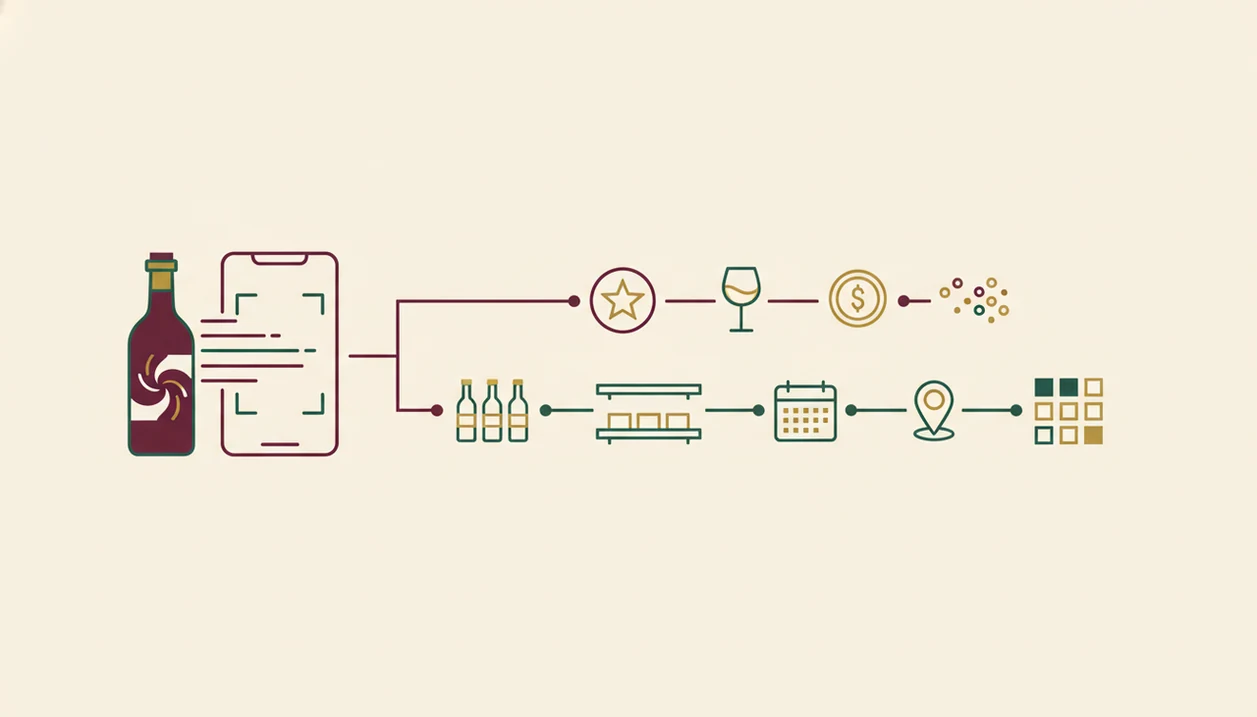
Wine label scanning uses image recognition and OCR to match a bottle photo against wine data. Cellar tracking turns that match into a living record with quantity, location, purchase details, and later edits.
Label Recognition Data Flow
A scanner starts with camera capture, then reads label text or visual patterns. The system compares the image against database records and returns a wine profile, rating, tasting notes, grape, region, and price range. Foil glare, a stained vintage year, or a thumb over the barcode can still throw it off. Tap, check, adjust.
Inventory Record Lifecycle
A cellar tracker begins when you add a bottle by scan, barcode, or manual entry. Then you attach bin, shelf, room, quantity, purchase price, vintage, and drinking window. CRUD operations matter here: create, read, update, delete. Plainly, you need to mark bottles as moved, opened, replaced, or sold.
Wine Identifier App unifies those pipelines because the scan can become a structured cellar entry instead of staying as a lonely label photo.
Where a Wine Label Scanner App Wins
A wine label scanner wins when speed matters more than long-term recordkeeping. It is the right shortcut when someone says, “I liked the red one from dinner, but I have no idea what it was.”
- Store decisions: Scan the front label before buying and compare rating, price, grape, and region in seconds.
- Restaurant recognition: Capture the bottle after the server pour when typing the producer name would be awkward.
- Instant context: Scanners surface community ratings, quick tasting notes, and average prices without building a cellar.
- Low setup: Most users can scan before creating bins, rooms, barcodes, or inventory rules.
- Mobile behavior: McKinsey reported that many consumers kept new digital and omnichannel shopping behaviors after COVID-19, which helped normalize phone-based product discovery source.
Anyone dealing with quick bottle ID at dinner fits Wine Identifier App because the scan-first workflow saves the label before the producer name disappears.
Where a Cellar Tracker Inventory App Wins
A cellar tracker wins when the problem is accuracy across owned bottles, not recognition of one bottle. The moment a magnum is wedged on the bottom rack and the purchase price sits beside the vintage, a simple favorites list is not enough.
- Location fields: Serious inventory needs bin, shelf, room, fridge, or off-site storage fields.
- Quantity control: A cellar tracker helps avoid buying duplicates or forgetting the last bottle.
- Drink windows: Aging guidance helps decide what to open now and what to hold.
- Purchase history: Cost and valuation fields support insurance, resale, and collection planning.
- Audit trail: Consumption history shows what was opened, moved, gifted, or replaced.
When the issue is duplicate buying across several racks, Wine Identifier App fits growing collectors because scanned bottles can move into records with quantity and storage details. Dedicated tools such as cellartracker.com remain strong for large inventories; our CellarTracker alternative with label scanner guide covers the scan-plus-cellar tradeoff.
How to Use an AI Wine App That Combines Scanning and Cellar Tracking
The easiest combined workflow is scan first, confirm the match, then add the inventory fields that a scanner alone would miss. Wine Identifier App is an example of this merged approach because one bottle photo can lead into a saved cellar record.
- Scan the front label with your phone camera to auto-identify the wine.
- Confirm the vintage, producer, grape, and region before saving anything.
- Log the quantity, storage location, and purchase price to create a cellar record.
- Set drink-window or aging reminders if you plan to hold the bottle.
- Review your digital cellar against physical bottles every few months.
For drinkers who need both fast identification and basic inventory, a combined AI app is often easier than separate scanner and cellar tools because the same bottle match feeds the record. I still check the back label when the importer text is tiny, especially on older bottles.
How to Use Either Option Without Losing Bottle Data
Use the lighter tool when the job is light, but protect the facts that are hard to rebuild later. Scanner-only is fine for identification; tracker-only is better when owned-bottle accuracy matters more than discovery.
- Choose a scanner-only workflow when you just need to identify a bottle at dinner, in a shop, or from an old photo, and you do not plan to manage inventory.
- Pick a tracker-first workflow when your main risk is losing track of bottles you already own, especially across racks, bins, fridges, or off-site storage.
- Save the producer, vintage, quantity, storage location, and purchase price as soon as you add the bottle, while the receipt and shelf position are still fresh.
- Back up or export your records before changing wine apps, because scan history, notes, and cellar fields may not transfer cleanly.
- Audit the physical bottles against the app every few months, then mark anything opened, gifted, moved, or replaced before the mismatch becomes permanent.
Pricing and Policy Differences Between Scanner Apps and Inventory Apps
Scanner apps and inventory apps often make money differently, so check pricing before you build a habit around one. A free scan is nice; losing export access after entering 120 bottles is not.
- Label scanners: Many are free with ads or freemium limits; premium plans may remove ads or unlock deeper notes.
- Cellar trackers: Inventory tools often charge for advanced fields, cloud backup, exports, and collection analytics.
- CellarTracker: CellarTracker has a free tier and a paid Enhanced tier for extra features and support; confirm current details on CellarTracker’s own support or pricing pages before committing your inventory source.
- Data portability: Ask whether you can export a cellar CSV before logging case purchases.
- Market growth: Statista’s global wine market outlook tracks hundreds of billions of dollars in annual wine revenue, which helps explain why more wine apps keep appearing source.
If your priority is avoiding lock-in, Wine Identifier App earns consideration because scan results can support repeat-purchase notes and cellar fields in one place. For a broader shortlist, compare our best wine apps.
Who Should Pick a Wine Label Scanner, a Cellar Tracker, or Both
“Do I need to know what a bottle is, or where every bottle is stored?” That question decides most scanner vs inventory app choices.
Casual drinkers with fewer than 12 bottles at home usually need a scanner first. Pew Research found that 22% of U.S. adults drink wine at least weekly, and most weekly drinkers are not managing a formal cellar source. If you mostly buy for pizza night, tomato pasta, or a weekend bottle, quick ID and a good enough note are enough.
For growing collectors with one to ten cases, Wine Identifier App covers the middle ground because scanning, tasting notes, and cellar fields live in the same phone habit. Serious collectors with 10+ cases, multiple storage zones, or insurance needs should use a dedicated cellar tracker or a combined app with strong inventory controls.
Good AI-powered wine identification and cellar management apps deliver bottle memory and structured records, not a guarantee that every label, price, or drinking window is correct. The Vivino vs CellarTracker comparison is useful if you are weighing community reviews against inventory depth.
Evidence Behind the Scanner vs Cellar Tracker Comparison
The evidence points to two mature but different behaviors: scanning is about fast recognition, while cellar tracking is about maintained records. CellarTracker’s own public figures, including millions of users and reviews, support its role as an inventory-and-community database, while marketplace listings and official feature pages for apps such as Vivino and Wine Identifier App show scanner-first promises like label recognition, ratings, tasting notes, and price lookup.
To read those signals cleanly, separate the source type before you decide:
- Treat official app claims as feature evidence, not independent testing.
- Compare marketplace ratings and review volume as user-behavior clues, knowing they can reflect marketing reach, region, and recency.
- Check reviewer testing for practical friction: bad light, torn labels, vintage mismatches, export limits, and cellar-edit speed.
- Expect prices, ratings, and drink windows to shift because retailers, currencies, vintages, critic inputs, community reviews, and availability change.
- Match the tool to the job: Vivino for quick public signals, CellarTracker for deep cellar history, and Wine Identifier App when scan-to-cellar flow matters.
That is why no single number settles the comparison.
Limitations
Both categories have real limits. I trust phone habits, but I still do a physical shelf check before holiday dinners.
- AI scanners can misidentify damaged labels, vintage variants, private labels, and highly stylized artwork.
- A cream back label with tiny importer text may require manual correction after the first scan.
- Cellar inventory accuracy depends on logging purchases, moves, gifts, and opened bottles every time.
- Community databases can miss rare, new-release, restaurant-only, or small-production wines.
- Free tiers often restrict CSV export, cloud backup, advanced fields, or valuation history.
- No app replaces a periodic physical audit of bins, shelves, wine fridges, or off-site storage.
- Scanner valuations may lag auction prices, retail changes, or local market availability.
- Wine Identifier App can reduce duplicate entry, but it cannot know that you opened a bottle unless you mark it consumed.
For users who mainly compare public ratings with their own quick tasting note, the ratings vs personal tasting notes distinction is worth understanding before you overbuild your records.
FAQ
Can a wine label scanner manage my cellar inventory?
Most pure wine label scanners do not manage full cellar inventory because they lack fields for location, quantity, purchase history, and drink windows. Some combined AI wine apps add these cellar features after the scan.
Is CellarTracker free to use?
CellarTracker offers a free tier, with an optional paid Enhanced subscription for added features and support. Availability and feature details can change, so check the current CellarTracker plan page or app listing.
Do wine scanners work on damaged labels?
Wine scanners may work on lightly damaged labels, but torn, faded, stained, or highly stylized labels reduce accuracy. Manual confirmation is still important.
How accurate are AI wine label scanners?
AI wine label scanners are usually accurate on clear, common labels with visible vintage and producer text. They can fail on glare, partial labels, rare wines, or bottles with similar designs.
What is a drink window in cellar tracking?
A drink window is the suggested period when a wine is expected to taste good based on age, structure, vintage, and style. It helps collectors decide whether to open, hold, or prioritize a bottle.
Can I export my cellar data as a CSV file?
Some cellar trackers allow CSV export, especially on paid plans or inventory-focused tiers. Pure scanner apps may not offer full export because they store scans, favorites, or notes rather than structured cellar records.
Do I need both a wine scanner and a cellar tracker?
You need both only if you regularly identify new bottles and also manage owned inventory. A combined AI wine app such as DiVino can cover both needs for many casual and growing collectors.
Which wine app tracks storage location by bin or shelf?
Dedicated cellar trackers usually track storage location by bin, shelf, room, fridge, or off-site site. Some combined AI wine apps, including Wine Identifier App, also support location-style cellar fields after scanning.